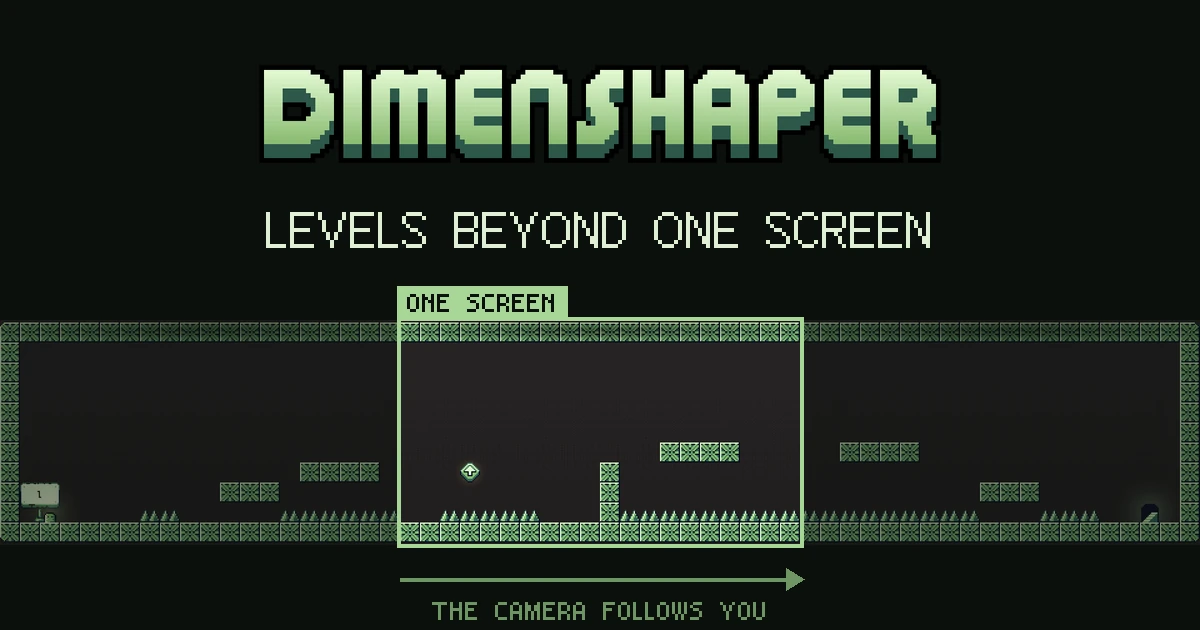
Until now, every Dimenshaper level fit on one screen of 20 × 11 tiles, so you could see the whole room before your first jump. We started to feel limited in what we could build. Some mechanics, like the dash or the bounce wall, only make sense when you have the space to use them, and the story needs room to unfold.
Version 0.98 drops the one-screen rule: a level can now be wider than the screen, and the camera follows you through it.
How the camera moves
- It looks ahead in the direction you run, so obstacles come into view before you reach them.
- While you dash, it looks further ahead to show where you'll land.
- When you turn around, it waits a moment before swinging back. Tapping left and right won't make it slosh.
- Jumping doesn't move it up and down. It re-centres on the height you land on, and only follows you mid-air if you go far above or below the middle of the screen.
- It snaps to whole pixels, which keeps the pixel art sharp while it scrolls.
Levels that fit one screen keep the fixed camera they always had.
Dash, level by level
Each level can now turn the dash on or off. In a level with the dash, a mid-air jump tile also gives your dash back, so you can chain jump, dash, tile, dash across a long gap.
Wider now, taller later
For now our levels only grow sideways. The first test level is three screens wide. Taller levels come later.
We think longer levels will be great for custom levels too, but not yet. Until these mechanics are polished, custom levels stay at one screen, without the dash. They may get both in a later version.
What's next
None of this is coming to the demo. The demo stays the 20 levels that end with the golem fight, plus your custom levels. We might add cutscenes and polish, but the levels won't change.
0.98 is an internal build of the full game for our testers on Steam. Longer levels are part of what we're preparing for Early Access.